
diados
Extension of the Day

diados

5.0 FREE
  • Screenshot 1

Description

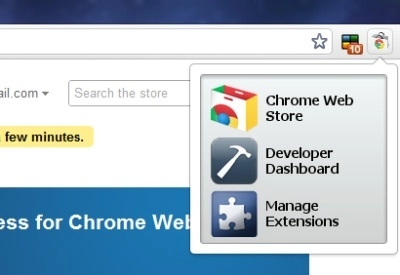
Please go to the option page and choose from the following: 1. Chrome Web Store 2. Developer Dashboard 3. Extensions window (the page where you manage your installed extensions) 4. A popup that contains all three links above How to change options: right click on the icon and go to "options" to change this setting. To manage your open tabs, check this out: https://chrome.google.com/webstore/detail/ackpfhlmgjdjlohhjmbacaajbmkkklnp Changelog: Version 1.1: added an option page. Version 1.2: added other icons. when you change options in the option page the icon will change as well. Version 1.24: made changes for compliances with branding guidelines Version 2.0: An option to have a popup that contains all three links when the icon is clicked; multi-language support Version 2.1: Substitute "extension gallery" for "developer dashboard", since the gallery is obsolete

Guides & Tutorials for 1 Click Access Extension for Chrome

How to install 1 Click Access Extension for Chrome
  1. Click the Preview / Download button above.
  2. Once redirected, accept the terms and click Install.
  3. Wait for the 1 Click Access Extension for Chrome download to finish on your device.
How to use 1 Click Access Extension for Chrome

This software is primarily used for its core features described above. Open the app after installation to explore its capabilities.

User Reviews for 1 Click Access Extension for Chrome 0

    No reviews found

Similar Apps


